












































































































































































































































































































































































































































































Enumerating Windows
Check this first for low-hanging fruit
17.12 - Stored Credentials & Windows Vault
17.
Tools
/usr/share/windows-resources
17.1.1 - Initial Checks
Try accessing other user's home dirs, check with icacls too.
17.1.2 - Situational Awareness
Aim to obtain this info:
- Username and hostname
- Group memberships of the current user
- Existing users and groups
- Operating system, version and architecture
- Network information
- Installed applications
- Running processes
- Running services
- Windows credentials
- Cloud metadata
- Browser information
- Interesting files and registry
- Events information
Check OS, version and architecture
systeminfo
hostname
17.1.3 - Directory Enumeration
Initial directory check
tree /f /a
List all files with specific attributes
dir /a-r-d /s /b
Get-ChildItem -Path C:\Users\ -Include *.txt,*.pdf,*.xls,*.xlsx,*.doc,*.docx,*.kdbx,.ssh -File -Recurse -ErrorAction SilentlyContinue
Check directories for hidden files/directories
Get-ChildItem -Force -Hidden
Check for cleartext password
findstr /si password *.txt
findstr /si password *.xml
findstr /si password *.ini
Find all those strings in config files.
dir /s *pass* == *cred* == *vnc* == *.config*
Find all passwords in all files.
findstr /spin "password" *.*
findstr /spin "password" *.*
Get-ChildItem -Path C:\ -Include local.txt -File -Recurse -ErrorAction SilentlyContinue
dir /s /p proof.txt
Get-ChildItem -Path C:\ -Filter "proof.txt" -Recurse -ErrorAction SilentlyContinue
dir /s /p local.txt
Get-ChildItem -Path C:\ -Filter "local.txt" -Recurse -ErrorAction SilentlyContinue
17.1.4- Log Enumeration
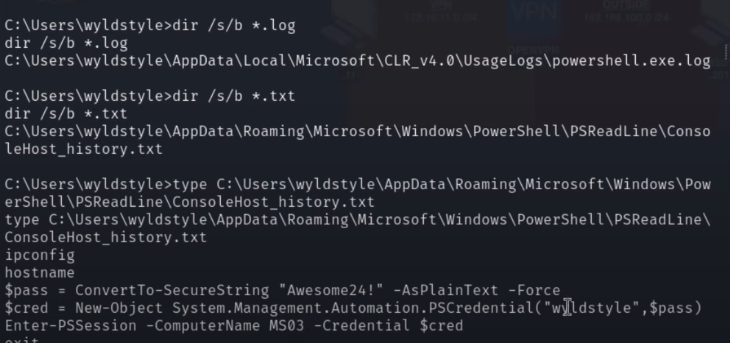
Check logs in a user's home dir
dir /s/b *.log
dir /s/b *.txt
17.1.5 - User Enumeration
Check user
whoami
echo %username%
Check user privileges
net user user1
Check current groups
whoami /groups
net localgroups
Check users and groups on the system using PowerShell cmdlets or CMD
Get-LocalUser
Get-LocalGroup
net user
Check users with SMB RID cycling (useful if you have no LDAP) (PowerView)
Invoke-RIDBrute -Domain target.local
Identify dormant users (PowerView)
Get-DomainUser -Properties lastlogon, lastlogontimestamp |
    Where-Object {($_.lastlogontimestamp -ne $null) -and
    (([datetime]::FromFileTime($_.lastlogontimestamp)) -lt (Get-Date).AddDays(-90)) } |
    Select-Object samaccountname, @{Name="LastLogonDate";Expression={[datetime]::FromFileTime($_.lastlogontimestamp)}}
Check local session logs or login history
Get-NetSession -ComputerName SRV22
Get-NetLoggedon -ComputerName SRV22
17.1.6 - Group Enumeration
View domain groups
net group /domain
Review members of specific groups
Get-LocalGroupMember adminteam
Review members of domain groups
net group /domain <Group Name>
17.1.7 - User Enumeration
List all network interfaces
ipconfig /all
route print
arp -A
Display all system routes (routing table)
route print
List all active network connections (-a for both TCP/UDP, -n for disabling name resolution, -o for showing the Process ID for each connection)
netstat -ano
17.1.8 - Application Enumeration
Check all installed apps by checking the Windows Registry for 32 & 64 bit apps respectively
Get-ItemProperty "HKLM:\SOFTWARE\Wow6432Node\Microsoft\Windows\CurrentVersion\Uninstall\*" | select displayname
Get-ItemProperty "HKLM:\SOFTWARE\Microsoft\Windows\CurrentVersion\Uninstall\*" | select displayname
Check which apps are currently running
Get-Process
Check the tasklist, useful for enumerating running services
tasklist /svc
17.1.9 - Firewall Enumeration
netsh firewall show state
netsh firewall show config
How well patched is the system?
wmic qfe get Caption,Description,HotFixID,InstalledOn
17.1.10 - MS Office File Enumeration
Is MS Office installed on the machine? If so, enumerate for those specifically
Recursive search of all (likely) office files
Get-ChildItem -Path C:\ -Recurse -Include *.doc,*.docx,*.xls,*.xlsx,*.ppt,*.pptx -ErrorAction SilentlyContinue
dir C:\*.doc* *.xls* *.ppt* /s /b
Look for recycle bin logs like this one, sometimes they uncover incredibly valuable information.

Check for files specifically in Users dir. Make sure to check with dir /a after this, super important for enumerating metadata.
Get-ChildItem -Path "C:\Users" -Recurse -Include *.doc*,*.xls*,*.ppt* -ErrorAction SilentlyContinue
dir "C:\Users\*.doc*" "C:\Users\*.xls*" "C:\Users\*.ppt*" /s /b
dir /a
Check the groups a specific user is a part of
net user steve
If we have GUI access, we can run commands as another user. Runas can be used with local and domain accounts as long as the user has the ability to log on to the system. Runas starts a cmd session here.
runas /user:backupadmin cmd
17.1.11 - Information Goldmine PowerShell
Check command history in PS
Get-History
Check PSReadLine, in this example it shows a history file saved from PSReadLine that we can read:
(Get-PSReadlineOption).HistorySavePath
type C:\Users\dave\AppData\Roaming\Microsoft\Windows\PowerShell\PSReadLine\ConsoleHost_history.txt
Example of creating a PSCredential object. We could attempt remote connection with Evil-WinRM after creating this.
$password = ConvertTo-SecureString "qwertqwertqwert123!!" -AsPlainText -Force
$cred = New-Object System.Management.Automation.PSCredential("daveadmin", $password)
Enter-PSSession -ComputerName CLIENTWK220 -Credential $cred
whoami
evil-winrm -i 192.168.50.220 -u daveadmin -p "qwertqwertqwert123\!\!"
17.1.12 - Mklink
This creates a symbolic link, junction or hard link. Essentially a fake file or folder that points to a real one somewhere else.
mklink /J "C:\Users\arthur\Desktop\ForTotalAV\MountPoint" "C:\Windows\Microsoft.NET\Framework\v4.0.30319"
17.1.13 - ADS (Alternative Data Streams)
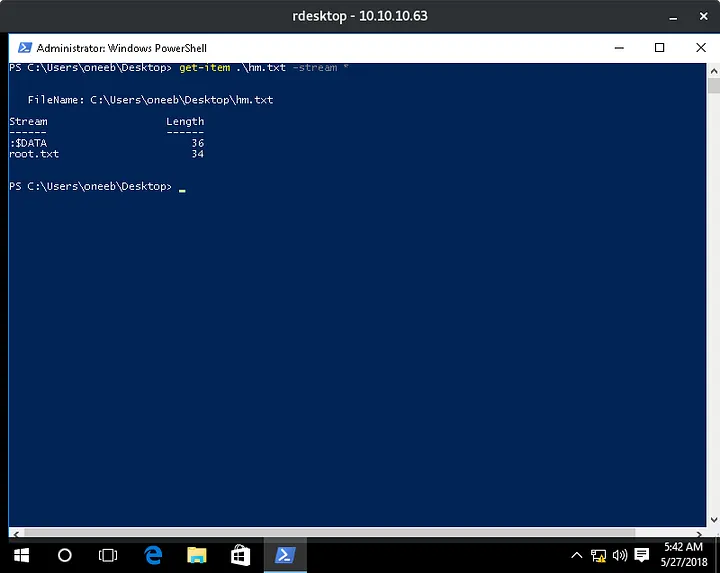
Basically ADS is a way for you to add data to a file that’s hidden from normal means of viewing, like through file explorer or printing the file out on a command line. You’ve got to use special directives to view these streams and it’s very easy for them to fly under the radar. They often get a bad rep because so much malware takes advantage of this.
Note that these streams are a feature of the Windows New Technology File System (NTFS), so transferring the file to your Linux system, or even a FAT32 Windows file system will erase any streams the file may have.
Check if a file has any other streams
Get-Item -Path .\file.txt -Stream *
17.1.14 - Git Commands
Check prod
cd C:\prod
type .gitconfig
git log
git show
Git setup
git config --global user.name "git"
git config --global user.email "git@userD"
Connect to ssh, then run git commands remotely
'ssh -i /home/kali/Documents/PG/userD/id_rsa -p 43022' git add --all
'ssh -i /home/kali/Documents/PG/userD/id_rsa -p 43022' git commit -m "PE Commit"
17.1.15 - Automated Enumeration
WinPEAS
.\winPEASx64.exe .
.\beroot.zip
.\SeatBelt.exe